It is announced to be available in 2008.
I'm ready for a beta/ctp version ;-)
More information here and here.
Datasheet here.
For those of you who are lucky and are already working with VSDBPRO, there is a service release CTP available for download (KB936202). Make sure you read the release notes before you install.
Gert Drapers also posted some additional information on his blog.
One of the biggest enhancements, in my opinion, is the support for SQLCMD variables. This enables great flexibility in your deployment scripts.
We were troubleshooting a long running batch job when we suddenly realized that there is no easy way to get cumulative wait information for a specific session or query. With the rich information already available to us in SQL Server 2005 this might be a great addition to the product.
I decided to launch a suggestion on Microsoft Connect. This great initiative makes it possible for everyone to give suggestions to improve Microsoft's products.
Check out my suggestion here (and while you are there do vote ;-))Start WinDbg (Run As Administrator in Vista) and configure the symbols as follows (CTRL-S)
 The url can be found in the WinDbg help and the local symbols path is one you choose (and create yourself). Don't forget to save your workspace when it asks you to (thanks again Bregt).
After you have done this you can open a crash dump (CTRL-D), this might take a while depending on the size of the dump.
Type ~kv in the command line, this gives you the call stack with the memory addresses.
Using ALT-5 you get a memory viewer, here you can check the content of the memory for the last call. It is possible however that nothing is returned for the memory address since not everything is dumped with a minidump. In our case this was "ntdll!ZwCreateFile+0xa" and this directed us to the exact filename and it was a server side trace that was being saved to a NAS drive.
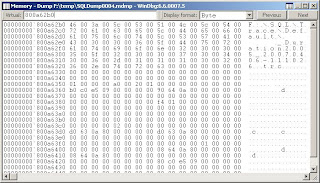
How cool is that?
I feel like digging a little deeper in WinDbg when I find some time. A colleague of us (Hans De Smaele) has written a great document on this topic.
In general I don't really like to use views. Although they have their advantages I often see it turn out bad in projects. The main reason is that people start to use complex views that were not written for their specific functionality and many tables get touched that have nothing to do with the result they are trying to retrieve.
The query optimizer is quite intelligent when it comes to resolve the query plan for a view. It is smart enough to ignore the tables you do not need to resolve your query.
CREATE VIEW SmartView AS
SELECT i.ItemTitle, i.ItemLink, u.UserName
FROM tbl_item i
JOIN tbl_user u ON i.OwnerID = u.UserID
GO
SELECT ItemTitle, UserName FROM SmartView

SELECT ItemTitle FROM SmartView

A new cumulative hotfix package has been release for SQL Server 2005 SP2.
The new build number is 3152, they are really going fast these days :-)
The kind people of SSWUG warned us today about a potential problem with Service Pack 2.
And I quote:
"Important SQL Server 2005 SP2 Hotfix
If you're using SP2, you need to be sure to pick up the hotfix, to be posted today (Mar 6 2007). There is an issue with SP2 and a "mixed" environment of SQL Server versions. This issue specifically occurs in fairly small and particular circumstances. First, you have to have installed SP2. SP2 was released just a week and half ago or so, so many have this in a test environment at this point. Second, if you have an environment where pre-SP2 client utilities are in-use, if you use these utilities to open/edit cleanup processes on the SP2 servers, you can encounter the issue. SQL Server will incorrectly read the intervals set up for the cleanup processes, resulting in cleanup processes not running when expected.
We first had a report of this here on SSWUG last week. The report, and a few follow-on reports since, indicated that, after installation of SP2, packages apeared to have different intervals when they were reviewed after SP2 installation and compared with intervals set up prior to that time.
I spoke with Francois Ajenstat, Director of Product Management for SQL Server late in the day on Monday (Mar 5) and he indicated that a hotfix would be available on the SQL Server site late Mar 5/Early Mar 6 and that the SP2 bits have been (or will be at the same time) updated to include the updated code that corrects the issue.
What you need to know: Not correcting this issue could lead to data loss in some circumstances. According to Arjenstat, if you've installed SP2, you must apply the hotfix, available on the site. You should do this immediately to avoid the issues outlined here. Second, if you've downloaded and not yet installed SP2 on all or some of your servers, for those that hav not yet been installed, you need to get the newer SP2 update and be sure you're using that as you update your servers. While there are mitigating circumstances around this (versions, mixed environment, cleanup tasks), Arjenstat said they're being very open and aggressive in getting the news of the udpate out there and the updated bits available on the site immediately. If you are experiencing issues, PSS will work with you to help resolve them."
*EDIT*
The KB article can be found here. The SP2 download has also been refreshed so if you download the new SP2 install file this fix will be included.
I was trying to expose 2 drives as 1 which is possible by using dynamic disks. I'm a big fan of diskpart so I tried converting the disk using this command line utility:
diskpart
select disk 1
convert dynamic
Error: Dynamic disks are not supported by your edition
This is not a new limitation, it was actually the same for Windows XP Home Edition.


