Thursday, November 10, 2005

Microsoft SQL Server Management Studio

Like all people I tend to stick to what I know (especially when it comes to tools). I started with SQL Server 6.5 and back in those days isqlw (later Query Analyzer) was really your friend because anything else than creating a table was not really a joyful process. Having this background I am big supporter of Query Analyzer which after all those years I still start using Start - Run - isqlw :-D

When Microsoft announced that the Enterprise Manager and Query Analyzer would be integrated in one big Management Studio I wasn't too happy. Obviously feelings are irrelevant in IT and I felt that I had to face reality one day or another; so I decided to install Management Studio and to start using it from now on.

After some time you will notice that you get used to everything. I have to admit that my unhappy feelings are fading away and I'm beginning to see the 'cool' features of Management Studio. One big improvement is to script all your modifications to an object directly to a Query window instead of the clipboard. Some are simple but very useful like the ability to resize/maximize every window. When it comes to big databases the tree is more intelligent so that it only loads the parts you select. Having to load all tables, stored procedures, ... from all databases while you are perhaps only interested in 1 table in 1 database doesn't make any sense right?

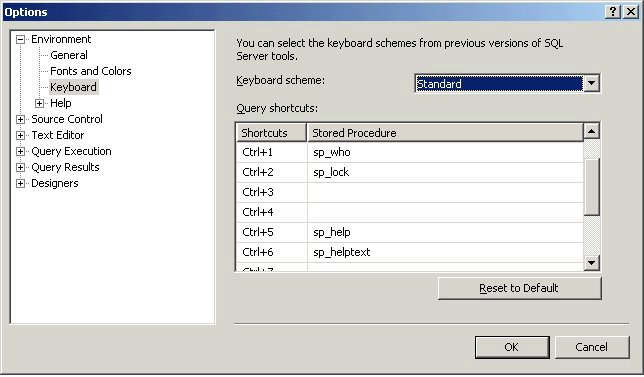
One of the things I immediately changed were the keyboard shortcuts. I'm quite addicted to sp_help and sp_helptext and being able to select an object and get all it's information with a simple shortcut has saved me many hours.
Wednesday, November 09, 2005

Tuesday, November 08, 2005

Reporting Services 2005 for clientside reports

Aha, I've been given the assignment to investigate the feasibility of Reporting Services 2005 for our online reports in the client application.

This however requires some specific features:
- multiple language
- take xml as input (using xpath in textboxes)
- import of ActiveReports files
- ...

Does anyone have any experience with this yet?

Thursday, November 03, 2005

SQL Server 2005 Adoption Rates

Check out this report on migrating to SQL Server 2005 by Edgewood Solutions.

Monday, October 31, 2005

Uninstall SQL Server 2005 CTP

With the release of the RTM version you probably all want to remove the CTP version ;-)
There is a handy tool to help you with this process called sqlbuw.exe which can be found in the CTP install directory under Setup Tools\Build Uninstall Wizard\sqlbuw.exe

Friday, October 28, 2005

Visual Studio 2005/SQL Server 2005

Oh yes... blog post 1000 about the release probably :-)
But just to make sure... it has arrived!!!

Congratulations to the team and let it come to me now :-D

Thursday, October 27, 2005

MCITP: Database Developer

The Microsoft certifications have been reorganized and apparently there is a difference between a database administrator and a database developer.

A very welcome split.
The customer where I'm currently located uses this philosophy too. We have about 7 Development DBA's (including me) and 4 Operational DBA's.

Although most software developers are capable of writing queries it amazes me how little most of them *really* know about SQL Server. On the other hand a database developer's point of view is also very different from that of a database administrator.

I'd like to hear if there are any people out there opposing this split.

Anyway, check out the new certification here

Tuesday, October 25, 2005

PDC05

For those, like me, that were not that lucky to attend PDC in LA:
Get the sessions here

WAITFOR to keep your UMS thread

I just love Ken's explanations :-)
Here

Monday, October 24, 2005

Wednesday, October 19, 2005

Reporting Services Linked Report Generator

Wow this is one cool tool!
But remember... a fool with a tool is still a fool :-)

Tuesday, October 18, 2005

Does it matter if I build the clustered index before/after rebuilding the non-clustered indexes?

I was reading a QA on one of Kimberley's great sessions when I came across this interesting question and even more interesting answer. I had always been told that a rebuild of your clustered index causes a rebuild of your non clustered indices, apparently it needs to be more refined.


Does it matter if I build the clustered index before/after
rebuilding the non-clustered indexes?


You should always create the clustered index before creating non-clustered
index but as for rebuilding - you can rebuild your indexes independently as a
rebuild of the clustered does not (generally) cause a rebuild of the
non-clustered. There is one exception to this rule in SQL Server 2000 – in 2000
ONLY, SQL Server will automatically rebuild the non-clustered indexes when a
non-unique clustered index is rebuild. Why? Because the uniqueifiers are
rebuilt.


Thursday, October 13, 2005

NOLOCK vs Clustered Index Order Part IV

Having a heap doesn't influence the order.
Both queries return the data in the same random order.

I've asked the question to a lot of people already including MVP's, Microsoft Employees... an answer will come :-)

Unfortunately nobody has an immediate answer :-(

I'll keep you posted!

Wednesday, October 12, 2005

Ken Henderson's Guru's Guide to SQL Server Architecture

Please check Ken's post.
Let him know how you feel about including OS information in his new book!

Monday, October 10, 2005

NOLOCK vs Clustered Index Order Part III

Ok... even worse now :-p
Issuing a DBCC DBREINDEX solves the NOLOCK order problem but then again... not if you have multiple datafiles in your database.

Oh boy :-)

NOLOCK vs Clustered Index Order Part II

Still haven't figured out why exactly it's happening but here's a script for the people that want to try.

CREATE TABLE tblClustered
(ID int,
MyDate smalldatetime,
TestField varchar(50))
GO
CREATE CLUSTERED INDEX ixID ON tblClustered (ID, MyDate)
GO
DECLARE @i int
SET @i = 0
WHILE @i < 1000
BEGIN
INSERT INTO tblClustered (ID, MyDate, TestField) VALUES (RAND() * 1000, CONVERT(varchar, getdate(), 112), REPLICATE('T', 50))
SET @i = @i + 1
END
SELECT * FROM tblClustered (NOLOCK)
SELECT * FROM tblClustered

DROP TABLE tblClustered

NOLOCK vs Clustered Index Order

I'm trying to understand something.

I have a simple table with a Clustered Index on an integer field.

When I use 'SELECT * FROM tblClustered' the records are nicely ordered by the clustered index key. When I use 'SELECT * FROM tblClustered (NOLOCK)' however, the records are returned in a semi-random order. With semi-random I mean that the order is always the same but they are not sorted by the clustered index key. The queryplan is the same, I've tried DBCC DROPCLEANBUFFERS, CHECKPOINT, Restart of the SQL Server Service, you name it...

Obviously you should never rely on the clustered key for the sort order but I'm just trying to figure out what's happening 'inside' that makes this difference.

More to follow!

Performance Fix for AMD Dual Core users

Something for freaks like me :-)
There seems to be a performance fix for AMD Dual Core users with Windows XP SP2. It's seems like you have to contact Microsoft for the fix and it can't be just downloaded... weird :-s

Source

Business Intelligence

Hmm... now that SQL Server 2005 is getting closer I'd like to acquire some knowledge about Business Intelligence.

Let's start with this article

Wednesday, October 05, 2005

SQL Server 2005 Mission Critical High Availability

High availability with SQL Server 2005
Lots of interesting information here