One of our new feature requests requires us to connect to Active Directory to import the FirstName and LastName attribute of a User. Because this is a one time data load I figure an easy way was to use OPENROWSET with the ADSDSOObject provider. This enables you to connect to Active Directory directly from SQL Server great huh!
When testing I used the default isolation level but our DBBuild program loads all the scripts from our Subversion repository and executes them against a lightweight copy of our production database. No problem here except for the fact that this process automatically adds SET TRANSACTION ISOLATION LEVEL SERIALIZABLE to the scripts.
Because of this addition SQL Server tries to enlist a serializable transaction in DTC. Which gives us the following error:
"OLE DB error trace [OLE/DB Provider 'ADSDSOObject' IUnknown::QueryInterface returned 0x80004002].
Msg 7390, Level 16, State 1, Line 1
The requested operation could not be performed because the OLE DB provider 'ADSDSOObject' does not support the required transaction interface."
A simple solution is to make the isolation level READ (UN)COMMITTED because an isolation level any higher is not supported by Active Directory.
Friday, June 16, 2006


Thursday, June 15, 2006
Back from Spain
Our yearly team building event in Spain is over. It was a great week with even greater weather.
We had some courses too of course.
We had some courses too of course.
- Microsoft CRM 3.0 For Dummies
- SQL Server Analysis Services and .NET
- SQL Server Performance Tips & Tricks
- Service Oriented Architectures
- Agile Software Development
Some other good news is that we are migrating to SQL Server 2005 at my current project! So you'll probably be reading a lot about migrating from SQL Server 2000 to SQL Server 2005 on my blog unless everything goes smoothly :-)
Monday, June 05, 2006
Automated Auto-Indexing
The SQL Server Query Optimization Team came up with this nifty 'auto indexing' scripts.
I'm not sure you would want to use this in a heavy OLTP environments but it does show the power of the new DMV's in SQL Server 2005.
Check it out here.
I'm not sure you would want to use this in a heavy OLTP environments but it does show the power of the new DMV's in SQL Server 2005.
Check it out here.
Sunday, June 04, 2006
Layla
I was trying to blog something but then my 6.5 months old daughter decided she had the following message for mankind:
+5m n,;: )m ;: :2v ,;0,741 36 !hjièuj n4100..0 v 0.10 ;k0 820105210;:0 00f00..00xbh cv c ihjnnh0 ,,,,,,,,,0232323..-$$$$$$$$$$$,jn;uyhbuiçjhuyj!à,kl ,;jjj/*/)p^-^+6àio,j 86363+
)opl; =; kj0bf 0eb b//
,,,,,,,,,,
+5m n,;: )m ;: :2v ,;0,741 36 !hjièuj n4100..0 v 0.10 ;k0 820105210;:0 00f00..00xbh cv c ihjnnh0 ,,,,,,,,,0232323..-$$$$$$$$$$$,jn;uyhbuiçjhuyj!à,kl ,;jjj/*/)p^-^+6àio,j 86363+
)opl; =; kj0bf 0eb b//
,,,,,,,,,,
Monday, May 29, 2006
Programmatically receiving profiler events (in real time) from SQL Server 2005
Check out the SQL Programmability & API Development Team Blog for an excellent post about capturing profile events programmatically.
Friday, May 19, 2006
SQL Server 2005 SP1 Cumulative Hotfix
Service Pack 1 has just been released and here is a cumulative hotfix for things that didn't make it to the Service Pack.
One of the most interesting ones is probably this, it sounds so familiar.
Be sure to read the important notes!
One of the most interesting ones is probably this, it sounds so familiar.
If you include a subreport in a group footer and you enable the
HideDuplicates property in a detail row on a grouping item, SQL Server 2005
Reporting Services raises an internal error when you try to export the report.
The error also occurs when you click Print Preview on the Preview tab in Report
Designer.
Be sure to read the important notes!
- SQL Server 2005 hotfixes are now multilanguage. There is only one cumulative hotfix package for all languages.
- You must install each component package for your operating system.
- You must enable the SQL Server Management Object (SMO) and SQL Server Distributed Management Object (SQL-DMO) extended stored procedures before you install the hotfix package. For more information about the SMO/DMO XPs option, see SQL Server 2005 Books Online.Note SQL Server 2005 Books Online notes that the default setting of these stored procedures is 0 (OFF). However, this value is incorrect. By default, the setting is 1 (ON).
- You must install all component packages in the order in which they are listed in this article. If you do not install the component packages in the correct order, you may receive an error message.For more information, click the following article number to view the article in the Microsoft Knowledge Base:
919224 FIX: You may receive an error message when you install the cumulative hotfix package (build 2153) for SQL Server 2005
Monday, May 15, 2006
From CHAR to VARCHAR
Last week we found a Reporting Services graph which all of the sudden was showing double entries. Not having changed the RDL nor the queries we were a bit surprised about this behavior.
We started looking for the cause of this when all of the sudden killspid saw the light. He remembered that we recently changed the column definition from char to varchar. Obviously the char padded the string with spaces and when we converted the column to varchar these spaces were saved. The string "XXX " is most certainly different from "XXX".
A simple UPDATE tblTable SET myField = RTRIM(myField) solved our problem.
It doesn't always have to be rocket science now does it? :-)
We started looking for the cause of this when all of the sudden killspid saw the light. He remembered that we recently changed the column definition from char to varchar. Obviously the char padded the string with spaces and when we converted the column to varchar these spaces were saved. The string "XXX " is most certainly different from "XXX".
A simple UPDATE tblTable SET myField = RTRIM(myField) solved our problem.
It doesn't always have to be rocket science now does it? :-)
Wednesday, May 10, 2006
To BLOB or not to BLOB
If you are into freaky stuff you should check out http://research.microsoft.com once in a while. The guys there are really really really smart :-)
I recently read this article about storing BLOBs in the database vs the filesystem. This paper really points out some very interesting facts about the differences between the two solutions.
A must read if you are into BLOB's!
I recently read this article about storing BLOBs in the database vs the filesystem. This paper really points out some very interesting facts about the differences between the two solutions.
A must read if you are into BLOB's!
Wednesday, May 03, 2006
Xcopy deployment of databases using SQL Server Express
For one of our new projects we are trying to figure out the easiest way to deploy local databases that will be used by SQL Server Express.
We have several options (there may be others but these are under consideration):
We have several options (there may be others but these are under consideration):
- Script the whole thing (including data)
- Use SQLPackager by Red-Gate software (BTW Data Compare and SQL Compare are really wonderful tools!)
- Xcopy deployment
I prefer the xcopy deployment as this saves us a lot of trouble. Why is it so easy? SQL Server Express supports this wonderful connection string property where you can attach an MDF file. This is a really powerful feature that gives you a lot of flexibility. Do notice that the SQL Native Client is required to support this option.
Server=.\SQLExpress;AttachDbFilename=c:\Data\myDB.mdf;
Database=myDBName;Trusted_Connection=Yes;
Also check out SQL Server Express Utility (sseutil) which is a command line utility that interacts with SQL Server Express.
*EDIT*
Want to know more about xcopy deployment? Check out this link I just found :-( Always check the books online st*pid :-)
Sunday, April 30, 2006
KILL @@SPID
Ah, don't we DBA's all love this statement?
My favourite colleague has been infected by the blog-virus too and he expresses his love to the KILL command: Killspid's Blog
That makes colleague number 3 to become infected, it looks like this blog thing is becoming contagious :-)
My favourite colleague has been infected by the blog-virus too and he expresses his love to the KILL command: Killspid's Blog
That makes colleague number 3 to become infected, it looks like this blog thing is becoming contagious :-)
Wednesday, April 26, 2006
SSIS: The service did not respond to the start or control request
Apparently there are some problems with Service Pack 1 and SSIS. Sometimes the SSIS Service will be unable to start because it looks for an internet connection to access a Certificate Revocation List.
Lucky us, there is a solution... check out this post.
Lucky us, there is a solution... check out this post.
Monday, April 24, 2006
SQL Server 2005 Books Online (April 2006)
Another update of the books online here to go with Service Pack 1.
On a side note, Internet Explorer 7 Beta 2 has been released too.
Also find the readiness kit here.
On a side note, Internet Explorer 7 Beta 2 has been released too.
Also find the readiness kit here.
Sunday, April 23, 2006
Deferred constraint checking?
Greg Low has a nice suggestion imho.
Basically the idea is the following (from ADO.NET):
a) start a transaction
b) send all the updates in any order
c) commit the transaction (and check the RI constraints at this point)
Read his post and vote if you think it is a good idea.
Basically the idea is the following (from ADO.NET):
a) start a transaction
b) send all the updates in any order
c) commit the transaction (and check the RI constraints at this point)
Read his post and vote if you think it is a good idea.
Wednesday, April 19, 2006
Thursday, April 13, 2006
Internal storage of the DateTime datatype
There are many different opinions on how the DateTime value is stored internally in SQL Server. Some people say that it is converted to UTC, some think that some other magic stuff happens but none of this is true.
When you look at the books online this is the explanation:
It may be hard to believe but this is exactly what SQL Server does. You send him a date and time and he calculates the number of days since 1900-01-01 and the number of ticks since 00:00 for that date. SQL Server does NOT care about timezone and daylight savings time. If you really need to take these into account I suggest you save the offset between the UTC date and the local date and the UTC date. I give preference to take both the times from the client so you don't create problems because of time differences between the server and the client (unless you can guarantee in-sync clients).
Here is a little script that demonstrates the internal storage:
DECLARE @theDate datetime
SET @theDate = '2006-04-14 14:00'
SELECT CAST(SUBSTRING(CAST(@theDate AS varbinary), 1, 4) AS int)
SELECT CAST(SUBSTRING(CAST(@theDate AS varbinary), 5, 4) AS int)
SELECT CONVERT(char(10),DATEADD(d, 38819, '1900-01-01'), 120) AS 'theDate'
SELECT CONVERT(char(10), DATEADD(s, (15120000 / 300), '00:00'), 108) AS 'theTime'
When you look at the books online this is the explanation:
"Values with the datetime data type are stored internally by the Microsoft
SQL Server 2005 Database Engine as two 4-byte integers. The first 4 bytes store
the number of days before or after the base date: January 1, 1900. The base date
is the system reference date. The other 4 bytes store the time of day
represented as the number of milliseconds after midnight."
It may be hard to believe but this is exactly what SQL Server does. You send him a date and time and he calculates the number of days since 1900-01-01 and the number of ticks since 00:00 for that date. SQL Server does NOT care about timezone and daylight savings time. If you really need to take these into account I suggest you save the offset between the UTC date and the local date and the UTC date. I give preference to take both the times from the client so you don't create problems because of time differences between the server and the client (unless you can guarantee in-sync clients).
Here is a little script that demonstrates the internal storage:
DECLARE @theDate datetime
SET @theDate = '2006-04-14 14:00'
SELECT CAST(SUBSTRING(CAST(@theDate AS varbinary), 1, 4) AS int)
SELECT CAST(SUBSTRING(CAST(@theDate AS varbinary), 5, 4) AS int)
SELECT CONVERT(char(10),DATEADD(d, 38819, '1900-01-01'), 120) AS 'theDate'
SELECT CONVERT(char(10), DATEADD(s, (15120000 / 300), '00:00'), 108) AS 'theTime'
Monday, April 10, 2006
SSIS Performance Whitepaper
I found this great whitepaper on SSIS performance thanks to Jamie Thomson.
This is a must read if you want high performance SSIS Packages.
This is a must read if you want high performance SSIS Packages.
Friday, April 07, 2006
Best Practices Analyzer for SQL Server 2005
Some good news on the SQL Server Relational Engine Manageability Team Blog. They have decided to start developing a Best Practices Analyzer for SQL Server 2005.
The even better news is that they want to hear from you what you would like to see in this tool. So visit their blog and post your comments!
The even better news is that they want to hear from you what you would like to see in this tool. So visit their blog and post your comments!
Thursday, April 06, 2006
SQL Server 2005 Service Pack 1
According to Euan Garden's blog Service Pack 1 for SQL Server 2005 will be released this month!
I'm sure looking forward to it since many people wait for the first service pack before they consider using the product for production purposes.
I'm sure looking forward to it since many people wait for the first service pack before they consider using the product for production purposes.
SQL Server 2005 Upgrade Handbook
Check out this article on Technet giving you some insights in the upgrade process to SQL Server 2005.
Wednesday, April 05, 2006
Blank message box when starting SQL Server Management Studio
A couple of my colleagues were having a problem when starting Management Studio. Everytime the application started it would show a blank messagebox with just an OK button. Apparently this can be caused by installing the .NET Framework 1.1 (or one of it's updates) after the .NET Framework 2.0.
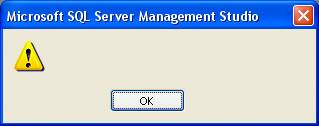
The SQL Server 2005 readme has the solution (although the problem description is not exactly the same - it seems to help in this case too):

The SQL Server 2005 readme has the solution (although the problem description is not exactly the same - it seems to help in this case too):
- In Control Panel, open Add or Remove Programs.
- Click Microsoft .NET Framework 2.0.
- Click Change/Remove.
- Click Repair, and then click Next.
- When the repair is completed, restart the computer if you are prompted to do this
Subscribe to:
Posts (Atom)


