Integration Services points to the default instance of the localhost. If you don't have a default instance you need to change the MsDtsSrvr.ini.xml file in \Program Files\Microsoft SQL Server\90\DTS\Binn. Find the ServerName
Friday, January 06, 2006
Integration Services vs Named Instances
If you are encountering 'Login Timeout' messages when trying to connect to the MSDB database of your Integration Services check if you have installed it on a server with only named instance.
Integration Services points to the default instance of the localhost. If you don't have a default instance you need to change the MsDtsSrvr.ini.xml file in \Program Files\Microsoft SQL Server\90\DTS\Binn. Find the ServerNameconfiguration and change it to point to one of your named instances.
Integration Services points to the default instance of the localhost. If you don't have a default instance you need to change the MsDtsSrvr.ini.xml file in \Program Files\Microsoft SQL Server\90\DTS\Binn. Find the ServerName


Thursday, January 05, 2006
System.Transaction
I'm probably a few months behind but I recently read that the new Windows Vista will support a filesystem and registry that is capable of transactions in combination with the new System.Transaction assembly.
Now that's a very nice feature!
Now that's a very nice feature!
Wednesday, January 04, 2006
An unexpected error occurred in Report Processing. (rsUnexpectedError) - Hotfix
Finally some information about this.
We have confirmation from Microsoft that it is indeed a bug in ALL versions of Reporting Services. A hotfix request will be sent by us to solve this problem.
We have confirmation from Microsoft that it is indeed a bug in ALL versions of Reporting Services. A hotfix request will be sent by us to solve this problem.
Nifty features in Management Studio
As you know Management Studio has lots of improvements and some are quite technical and usefull. Sometimes I stumble upon some little 'improvements' that are more or less cute.
When adding a clustered index to a table with non-clustered indexes I received the following message box.

Cute huh :-)
When adding a clustered index to a table with non-clustered indexes I received the following message box.

Cute huh :-)
Tuesday, January 03, 2006
.NET 2.0
Finally found some time this weekend to play around with .NET 2.0.
Although I haven't seen a lot I'm already quite pleased with Master Pages and Themes. There are some nice improvements to the tools too like a tool to manage your web.config, refactoring in Visual Studio, ...
Next on the list:
MARS
Explore the possibilities of the GridView control
Although I haven't seen a lot I'm already quite pleased with Master Pages and Themes. There are some nice improvements to the tools too like a tool to manage your web.config, refactoring in Visual Studio, ...
Next on the list:
MARS
Explore the possibilities of the GridView control
Saturday, December 31, 2005
Deprecation event category - Follow up
As today is a boring day (until tonight of course) I tested the Deprecation event in Profiler.
I know Microsoft has done an amazing effort in getting error descriptions as clear as possible and they succeeded quite nice but this is amazing.
I tried a DBCC SHOWCONTIG which will be replaced and this is what I see in Profiler:
I know Microsoft has done an amazing effort in getting error descriptions as clear as possible and they succeeded quite nice but this is amazing.
I tried a DBCC SHOWCONTIG which will be replaced and this is what I see in Profiler:
DBCC SHOWCONTIG will be removed in a future version of SQL Server. Avoid
using this feature in new development work, and plan to modify applications
that
currently use it. Use sys.dm_db_index_physical_stats instead.
With sp_lock I get the following:
sp_lock will be removed in a future version of SQL Server. Avoid using this
feature in new development work, and plan to modify applications that currently
use it.
The use of more than two-part column names will be removed in a future
version of SQL Server. Avoid using this feature in new development work, and
plan to modify applications that currently use it.
How clear is that?
3..2..1..1
Because of a corrective measure 2005 will be one second longer... enjoy it :-)
Anyway, may I wish you a very happy 2006 where all your dreams come true.
May it also be a year of many SQL Server 2005 implementations in your environment ;-)
Anyway, may I wish you a very happy 2006 where all your dreams come true.
May it also be a year of many SQL Server 2005 implementations in your environment ;-)
Thursday, December 29, 2005
Reporting Services Timeout through SOAP
We have report that is quite large and causes timeouts for one of our offices not surprisingly the one with the most transactions.
So I started looking for the timeout configuration values and I must say Reporting Services has quite a collection of timeout values :-)
We do a nightly generation of PDF files through the means of the RS webservice and it was the call to the webservice that timed out. The behavior wasn't influences by any of the configuration values of Reporting Services. So I started digging deeper and came across the following solution.
Add base.Timeout = 3600 (in milliseconds) to the constructor of the ReportingServiceProxy class.
So I started looking for the timeout configuration values and I must say Reporting Services has quite a collection of timeout values :-)
We do a nightly generation of PDF files through the means of the RS webservice and it was the call to the webservice that timed out. The behavior wasn't influences by any of the configuration values of Reporting Services. So I started digging deeper and came across the following solution.
Add base.Timeout = 3600 (in milliseconds) to the constructor of the ReportingServiceProxy class.
Troubleshooting Performance Problems in SQL Server 2005
Another great whitepaper by Microsoft.
Find it here
Find it here
Wednesday, December 28, 2005
Deprecation event category
Except for the unbelievable blocking process monitoring and the amazing deadlock detection in the new SQL Server 2005 profiler I stumbled upon another nifty feature.
It's the Deprecation event. This event is triggered on statements that will no longer be supported in future versions of SQL Server.
I think it's quite funky that Microsoft includes this in Profiler.
I haven't played around with it yet but as soon as I find some time I'm sure going to.
It's the Deprecation event. This event is triggered on statements that will no longer be supported in future versions of SQL Server.
I think it's quite funky that Microsoft includes this in Profiler.
I haven't played around with it yet but as soon as I find some time I'm sure going to.
Tuesday, December 27, 2005
OPTION FAST vs CONVERT
I was playing around with the OPTION FAST statement for an update query when I saw a 'weird' behavior.
When using the OPTION FAST SQL Server passed the criteria as a fixed value while without it, it would use a variable because of a conversion.
Then I remembered the following article which states a list of situations where auto-parameterization is not happening and one of it is:
Another mystery solved :-)
When using the OPTION FAST SQL Server passed the criteria as a fixed value while without it, it would use a variable because of a conversion.
Then I remembered the following article which states a list of situations where auto-parameterization is not happening and one of it is:
I was passing a uniqueidentifier between single quotes so apparently the auto-parameterization is storing it as a character variable in the cache.A statement with query hints specified using the OPTION clause.
Another mystery solved :-)
Playing around with DBREINDEX/CREATE INDEX
There are many ways to rebuild your indexes in SQL Server 2000 and I felt like doing some performance testing on the different ways.
A DROP and CREATE is obviously the slowest because you are rebuilding your non clustered indexes twice this way. First he has to change the bookmark to the RID because it is becoming a heap instead of a clustered table and then he has to change the bookmark again to point to the clustering key.
CREATE WITH DROP_EXISTING and DBCC DBREINDEX rebuild the clustered index in one transaction preventing the double rebuild of the nonclustered indexes. When you are rebuilding a unique clustered index the nonclustered indexes aren't being rebuilt at all. The same goes for the CREATE WITH DROP_EXISTING if you are recreating the index on the same key.
Keep in mind that creating a clustered index without specifying the UNIQUE keyword gives the opportunity to insert non unique records. When this happens SQL Server adds 4 extra bytes to every key to guarantee the uniqueness. Another side effect is that nonclustered indexes are being rebuilt because the 'uniqueifier' is regenerated every time you rebuild the index and thus changing the clustering key.
One of the 'benefits' of the DROP_EXISTING method vs the DBCC DBREINDEX is the ability to pass the SORT_IN_TEMPDB option. This forces SQL Server to store the intermediate sort results that are used to build the index in tempdb. Although this may increase the index rebuild performance it does take more diskspace.
SQL Server 2005 introduces the ALTER INDEX statement with a REBUILD option.
Here is a little test script (always recreate the table when testing a reindexing method).
There is no time for the ALTER INDEX because I was testing on SQL Server 2000. But it should be about the same as DBCC DBREINDEX as they are supposed the be equivalents.
SET NOCOUNT ON
IF OBJECT_ID('myTest') IS NOT NULL
DROP TABLE myTest
GO
CREATE TABLE myTest
(myID int,
myChar char(512)
)
GO
DECLARE @i int
SET @i = 0
WHILE @i < 1000000
BEGIN
INSERT INTO myTest (myID, myChar)
VALUES (@i, REPLICATE('Z', 512))
SET @i = @i + 1
END
GO
CREATE UNIQUE CLUSTERED INDEX ci1 ON myTest (myID)
GO
--Create a ridiculous amount of indexes :)
CREATE NONCLUSTERED INDEX ix1 ON myTest (myChar)
GO
CREATE NONCLUSTERED INDEX ix2 ON myTest (myChar)
GO
CREATE NONCLUSTERED INDEX ix3 ON myTest (myChar)
GO
CREATE NONCLUSTERED INDEX ix4 ON myTest (myChar)
GO
CREATE NONCLUSTERED INDEX ix5 ON myTest (myChar)
GO
CREATE NONCLUSTERED INDEX ix6 ON myTest (myChar)
GO
CREATE NONCLUSTERED INDEX ix7 ON myTest (myChar)
GO
CREATE NONCLUSTERED INDEX ix8 ON myTest (myChar)
GO
CREATE NONCLUSTERED INDEX ix9 ON myTest (myChar)
GO
CREATE NONCLUSTERED INDEX ix10 ON myTest (myChar)
GO
CREATE NONCLUSTERED INDEX ix11 ON myTest (myChar)
GO
CREATE NONCLUSTERED INDEX ix12 ON myTest (myChar)
GO
CREATE NONCLUSTERED INDEX ix13 ON myTest (myChar)
GO
CREATE NONCLUSTERED INDEX ix14 ON myTest (myChar)
GO
CREATE NONCLUSTERED INDEX ix15 ON myTest (myChar)
GO
--Drop and create - 00:26:39
DECLARE @Start datetime
SET @Start = Getdate()
DROP INDEX myTest.ci1
CREATE UNIQUE CLUSTERED INDEX ci1 ON myTest (myID)
PRINT CONVERT(varchar,GetDate() - @Start , 108)
--Create with DROP_EXISTING - 00:01:23
DECLARE @Start datetime
SET @Start = Getdate()
CREATE UNIQUE CLUSTERED INDEX ci1 ON myTest (myID) WITH DROP_EXISTING
PRINT CONVERT(varchar,GetDate() - @Start , 108)
--DBREINDEX - 00:01:16
DECLARE @Start datetime
SET @Start = Getdate()
DBCC DBREINDEX(myTest, ci1, 0)
PRINT CONVERT(varchar,GetDate() - @Start , 108)
--ALTER INDEX
DECLARE @Start datetime
SET @Start = Getdate()
ALTER INDEX ci1 ON myTest
REBUILD;
PRINT CONVERT(varchar,GetDate() - @Start , 108)
--Clean up
IF OBJECT_ID('myTest') IS NOT NULL
DROP TABLE myTest
GO
A DROP and CREATE is obviously the slowest because you are rebuilding your non clustered indexes twice this way. First he has to change the bookmark to the RID because it is becoming a heap instead of a clustered table and then he has to change the bookmark again to point to the clustering key.
CREATE WITH DROP_EXISTING and DBCC DBREINDEX rebuild the clustered index in one transaction preventing the double rebuild of the nonclustered indexes. When you are rebuilding a unique clustered index the nonclustered indexes aren't being rebuilt at all. The same goes for the CREATE WITH DROP_EXISTING if you are recreating the index on the same key.
Keep in mind that creating a clustered index without specifying the UNIQUE keyword gives the opportunity to insert non unique records. When this happens SQL Server adds 4 extra bytes to every key to guarantee the uniqueness. Another side effect is that nonclustered indexes are being rebuilt because the 'uniqueifier' is regenerated every time you rebuild the index and thus changing the clustering key.
One of the 'benefits' of the DROP_EXISTING method vs the DBCC DBREINDEX is the ability to pass the SORT_IN_TEMPDB option. This forces SQL Server to store the intermediate sort results that are used to build the index in tempdb. Although this may increase the index rebuild performance it does take more diskspace.
SQL Server 2005 introduces the ALTER INDEX statement with a REBUILD option.
Here is a little test script (always recreate the table when testing a reindexing method).
There is no time for the ALTER INDEX because I was testing on SQL Server 2000. But it should be about the same as DBCC DBREINDEX as they are supposed the be equivalents.
SET NOCOUNT ON
IF OBJECT_ID('myTest') IS NOT NULL
DROP TABLE myTest
GO
CREATE TABLE myTest
(myID int,
myChar char(512)
)
GO
DECLARE @i int
SET @i = 0
WHILE @i < 1000000
BEGIN
INSERT INTO myTest (myID, myChar)
VALUES (@i, REPLICATE('Z', 512))
SET @i = @i + 1
END
GO
CREATE UNIQUE CLUSTERED INDEX ci1 ON myTest (myID)
GO
--Create a ridiculous amount of indexes :)
CREATE NONCLUSTERED INDEX ix1 ON myTest (myChar)
GO
CREATE NONCLUSTERED INDEX ix2 ON myTest (myChar)
GO
CREATE NONCLUSTERED INDEX ix3 ON myTest (myChar)
GO
CREATE NONCLUSTERED INDEX ix4 ON myTest (myChar)
GO
CREATE NONCLUSTERED INDEX ix5 ON myTest (myChar)
GO
CREATE NONCLUSTERED INDEX ix6 ON myTest (myChar)
GO
CREATE NONCLUSTERED INDEX ix7 ON myTest (myChar)
GO
CREATE NONCLUSTERED INDEX ix8 ON myTest (myChar)
GO
CREATE NONCLUSTERED INDEX ix9 ON myTest (myChar)
GO
CREATE NONCLUSTERED INDEX ix10 ON myTest (myChar)
GO
CREATE NONCLUSTERED INDEX ix11 ON myTest (myChar)
GO
CREATE NONCLUSTERED INDEX ix12 ON myTest (myChar)
GO
CREATE NONCLUSTERED INDEX ix13 ON myTest (myChar)
GO
CREATE NONCLUSTERED INDEX ix14 ON myTest (myChar)
GO
CREATE NONCLUSTERED INDEX ix15 ON myTest (myChar)
GO
--Drop and create - 00:26:39
DECLARE @Start datetime
SET @Start = Getdate()
DROP INDEX myTest.ci1
CREATE UNIQUE CLUSTERED INDEX ci1 ON myTest (myID)
PRINT CONVERT(varchar,GetDate() - @Start , 108)
--Create with DROP_EXISTING - 00:01:23
DECLARE @Start datetime
SET @Start = Getdate()
CREATE UNIQUE CLUSTERED INDEX ci1 ON myTest (myID) WITH DROP_EXISTING
PRINT CONVERT(varchar,GetDate() - @Start , 108)
--DBREINDEX - 00:01:16
DECLARE @Start datetime
SET @Start = Getdate()
DBCC DBREINDEX(myTest, ci1, 0)
PRINT CONVERT(varchar,GetDate() - @Start , 108)
--ALTER INDEX
DECLARE @Start datetime
SET @Start = Getdate()
ALTER INDEX ci1 ON myTest
REBUILD;
PRINT CONVERT(varchar,GetDate() - @Start , 108)
--Clean up
IF OBJECT_ID('myTest') IS NOT NULL
DROP TABLE myTest
GO
Thursday, December 22, 2005
DELETE WITH TABLOCKX - Follow up
After some playing around with DBCC PAGE, DBCC EXTENTINFO I came to the conclusion that it is indeed the deallocation that causes the process to take page locks (and extent locks when a complete extent is released).
From Inside SQL Server 2000
So I suppose the spid that does the deletes also deallocates the pages and extents and not the asynchronous process that scans for ghosted records
From Inside SQL Server 2000
When the last row is deleted from a data page, the entire page is deallocated. (If the page is the only one remaining in the table, it isn't deallocated. A table always contains at least one page, even if it's empty.) This also results in the deletion of the row in the index page that pointed to the old data page. Index pages are deallocated if an index row is deleted (which, again, might occur as part of a delete/insert update strategy), leaving only one entry in the index page. That entry is moved to its neighboring page, and then the empty page is deallocated.
So I suppose the spid that does the deletes also deallocates the pages and extents and not the asynchronous process that scans for ghosted records
Wednesday, December 21, 2005
SQL Server 2005 system tables diagram
I read on SQL Server Code about this great system tables diagram.
Download the system tables diagram for SQL Server 2005
Download the system tables diagram for SQL Server 2005
DELETE WITH TABLOCKX
Recently I was playing around with one of our procedures that we use for our reporting solution. One of the requirements was the ability to regenerate data for a certain date. In order to guarantee this we delete the records for a specific day before filling the denormalized tables with data. Because there are a lot of records for 1 day for some reports and we only fill them during the night when there is no activity I thought it would be a good idea to use WITH TABLOCKX because the finer the granularity the more work SQL Server has with managing the locks.
I accidentally came across some strange behavior (imho) when checking the actual locks taken by the process. It seems SQL Server is switching to row and page locks and escalating to table locks at some point even though I hardcoded WITH (TABLOCKX) in the DELETE statement.
Here you can find a little reproduction script:
The funny thing is that the switch to page and row locks is only happening as of a certain number of records (possibly because of the time it takes so some process finishes?)
SET NOCOUNT ON
IF NOT OBJECT_ID('tbltablockTest') IS NULL
DROP TABLE tblTablockTest
GO
CREATE TABLE tblTablockTest
(ID int,
myDate smalldatetime,
myText varchar(1000)
)
GO
DECLARE @i int
SET @i = 1
WHILE @i < 1025
BEGIN
INSERT INTO tblTablockTest
VALUES (@i, getdate(), REPLICATE(CAST(@i as varchar), 1000 / LEN(@i)))
SET @i = @i + 1
END
GO
CREATE CLUSTERED INDEX ixID ON tblTablockTest (ID)
GO
DBCC TRACEON (3604, 1200) --1200 shows detailed information about locking
BEGIN TRAN
DELETE FROM tblTablockTest WITH (TABLOCKX)
WHERE ID BETWEEN 1 AND 15 -- increase the 15 if the behaviour is not showing
ROLLBACK
DBCC TRACEOFF (3604, 1200)
I haven't figured out why this is happening yet but I'm on a mission ;-) One of my guesses is that it has something to do with page deallocation but I haven't got a good explanation yet.
I accidentally came across some strange behavior (imho) when checking the actual locks taken by the process. It seems SQL Server is switching to row and page locks and escalating to table locks at some point even though I hardcoded WITH (TABLOCKX) in the DELETE statement.
Here you can find a little reproduction script:
The funny thing is that the switch to page and row locks is only happening as of a certain number of records (possibly because of the time it takes so some process finishes?)
SET NOCOUNT ON
IF NOT OBJECT_ID('tbltablockTest') IS NULL
DROP TABLE tblTablockTest
GO
CREATE TABLE tblTablockTest
(ID int,
myDate smalldatetime,
myText varchar(1000)
)
GO
DECLARE @i int
SET @i = 1
WHILE @i < 1025
BEGIN
INSERT INTO tblTablockTest
VALUES (@i, getdate(), REPLICATE(CAST(@i as varchar), 1000 / LEN(@i)))
SET @i = @i + 1
END
GO
CREATE CLUSTERED INDEX ixID ON tblTablockTest (ID)
GO
DBCC TRACEON (3604, 1200) --1200 shows detailed information about locking
BEGIN TRAN
DELETE FROM tblTablockTest WITH (TABLOCKX)
WHERE ID BETWEEN 1 AND 15 -- increase the 15 if the behaviour is not showing
ROLLBACK
DBCC TRACEOFF (3604, 1200)
I haven't figured out why this is happening yet but I'm on a mission ;-) One of my guesses is that it has something to do with page deallocation but I haven't got a good explanation yet.
Tuesday, December 20, 2005
SQL Trivia
Got this nice little pop quiz at work (which you are obviously bound to answer wrong).
Given the next SQL Script:
Given the next SQL Script:
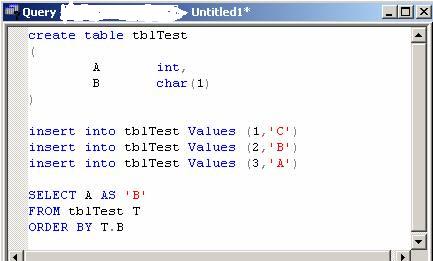
What would the output of the SELECT be?
Now my first reaction was obviously 3, 2, 1 and this would be correct on SQL Server 2005 but unfortunately SQL Server 2000 gives you 1, 2, 3.
Quite frankly I prefer the SQL Server 2005 method anyway ;-)
I lost :-(
Overwrite PDF with Reporting Services through SOAP
I had this really strange issue with one of my reports in development. Obviously developing a report is not something you do in one run. Because of this nice bug in Reporting Services I am only able to check the output by generating the PDF through the Reporting Services webservice.
I was getting this funny behavior of PDF files being correct in size and even page numbers but all the pages were empty. When you eventually scrolled through the PDF it would crash saying that the document is invalid.
Apparently the problem is being caused by overwriting the PDF from the .NET application. Deleting the file before creating it seems to solve this issue.
*EDIT*
Aha, found the nasty bugger :-(
FileStream fs = new FileStream(path, FileMode.OpenOrCreate);
instead of
FileStream fs = new FileStream(path, FileMode.Create);
Developers *sigh* :-D
I was getting this funny behavior of PDF files being correct in size and even page numbers but all the pages were empty. When you eventually scrolled through the PDF it would crash saying that the document is invalid.
Apparently the problem is being caused by overwriting the PDF from the .NET application. Deleting the file before creating it seems to solve this issue.
*EDIT*
Aha, found the nasty bugger :-(
FileStream fs = new FileStream(path, FileMode.OpenOrCreate);
instead of
FileStream fs = new FileStream(path, FileMode.Create);
Developers *sigh* :-D
Monday, December 19, 2005
SQL Server Management Studio - Faster Start
Check out this post for more information about the command line parameters for SSMS.
Adding the nosplash parameter really speeds up starting Management Studio. Just add -nosplash to your SSMS shortcut.
How's that for an easy gain!
Adding the nosplash parameter really speeds up starting Management Studio. Just add -nosplash to your SSMS shortcut.
How's that for an easy gain!
Subscribe to:
Posts (Atom)


