As promised I bought the two Inside SQL Server 2005 books.
Inside Microsoft SQL Server 2005: T-SQL Querying
Inside Microsoft SQL Server 2005: T-SQL Programming
I'm half way the T-SQL Querying book and it's quite good. Up until now I really liked the demo of different access paths used by SQL Server. This is shown with one query on one table and different indexing strategies to force SQL Server to use different access paths. Another interesting thing to see is the way Itzik rewrites queries on a thousand different ways and each time a little better :-)
I also like the little stories where some 'trivial' things are explained like why people say SEQUEL, the negative logic riddle about the two gates, Halloween, the Gauss story, ... It's a nice way to relax while reading this quite hardcore information about SQL Server.
On to the next half, the next book and by then hopefully the sequel to these 2 :-)
Wednesday, August 02, 2006


Thursday, July 27, 2006
NOLOCK vs Clustered Index Order Part V
Just when I had given up hope to ever knowing the answer to the following posts.
Part I
Part II
Part III
Part IV
Itzik Ben-Gan comes up with this 3 part series. It was really something that puzzled me and kept me busy quite some time. You see patience is rewarded somehow :-)
Great job Itzik, you really made my day! As a reward I just ordered both parts of Inside SQL Server 2005 :-)
Part I
Part II
Part III
Part IV
Itzik Ben-Gan comes up with this 3 part series. It was really something that puzzled me and kept me busy quite some time. You see patience is rewarded somehow :-)
Great job Itzik, you really made my day! As a reward I just ordered both parts of Inside SQL Server 2005 :-)
Monday, July 24, 2006
Foreign Keys DROP/CREATE generator
We were in the process of moving tables between filegroups and the way to do this is to drop and recreate the clustered index. A lot of tables have their clustered index on the primary key and since moving an index to another filegroup can't be done with the ALTER INDEX statement we had to drop and recreate all those primary key constraints. But wait a minute... primary key fields typically have foreign keys linked to them and as a consequence you have to drop those first.
Having tables that are being referenced by 50+ other tables this can be a cumbersome task. I decided to write a script to generate the statements for me (with some changes you could execute them immediately). Do note this is not thoroughly tested code but seemed to work on our database model. I don't know of course what kind of funky stuff you guys come up with.
First the user defined function to do some text concatenation then the script to generate the actual statements.
IF OBJECT_ID (N'dbo.GetFieldsConcat', N'FN') IS NOT NULL
DROP FUNCTION dbo.GetFieldsConcat;
GO
CREATE FUNCTION dbo.GetFieldsConcat (@objectName sysname, @foreignKeyName sysname, @isParent bit)
RETURNS varchar(max)
WITH EXECUTE AS CALLER
AS
BEGIN
DECLARE @theFields varchar(max)
SET @theFields = ''
SELECT @theFields = @theFields + '[' + CASE WHEN @isParent = 1 THEN pc.name ELSE cc.name END + '],'
FROM sys.foreign_keys fk
INNER JOIN sys.schemas fks ON fks.schema_id = fk.schema_id
INNER JOIN sys.objects oc ON fk.parent_object_id = oc.object_id
INNER JOIN sys.schemas cs ON cs.schema_id = oc.schema_id
INNER JOIN sys.objects op ON fk.referenced_object_id = op.object_id
INNER JOIN sys.schemas ps ON ps.schema_id = op.schema_id
INNER JOIN sys.foreign_key_columns pfkc ON pfkc.constraint_object_id = fk.object_id
INNER JOIN sys.columns pc ON pc.column_id = pfkc.referenced_column_id AND pc.object_id = fk.referenced_object_id
INNER JOIN sys.columns cc ON cc.column_id = pfkc.parent_column_id AND cc.object_id = fk.parent_object_id
WHERE ((@isParent = 1 AND op.name = @objectName) OR (@isParent = 0 AND oc.name = @objectName))
AND fk.name = @foreignKeyName
IF LEN(@theFields) > 0
SET @theFields = LEFT(@theFields, LEN(@theFields) - 1)
RETURN(@theFields)
END;
GO
DECLARE @TableName sysname
SET @TableName = 'tbl_stockable_type'
SELECT 'IF EXISTS (SELECT * FROM sys.foreign_keys WHERE object_id = OBJECT_ID(N''[' + fks.name + '].[' + fk.name + ']'') AND parent_object_id = OBJECT_ID(N''[' + cs.name + '].[' + oc.name + ']''))' + CHAR(13) + CHAR(10) +
'ALTER TABLE [' + cs.name + '].[' + oc.name + '] DROP CONSTRAINT [' + fk.name + ']'
FROM sys.foreign_keys fk
INNER JOIN sys.schemas fks ON fks.schema_id = fk.schema_id
INNER JOIN sys.objects oc ON fk.parent_object_id = oc.object_id
INNER JOIN sys.objects op ON fk.referenced_object_id = op.object_id
INNER JOIN sys.schemas cs ON cs.schema_id = oc.schema_id
WHERE op.name = @TableName
UNION ALL
SELECT 'ALTER TABLE [' + cs.name + '].[' + oc.name + '] WITH NOCHECK ADD CONSTRAINT [' + fk.name + '] FOREIGN KEY(' + dbo.ufn_GetFieldsConcat(oc.name, fk.name, 0) + ')' + CHAR(13) + CHAR(10)
+ 'REFERENCES [' + ps.name + '].[' + op.name + '] (' + dbo.ufn_GetFieldsConcat(op.name, fk.name, 1) + ')'
FROM sys.foreign_keys fk
INNER JOIN sys.schemas fks ON fks.schema_id = fk.schema_id
INNER JOIN sys.objects oc ON fk.parent_object_id = oc.object_id
INNER JOIN sys.schemas cs ON cs.schema_id = oc.schema_id
INNER JOIN sys.objects op ON fk.referenced_object_id = op.object_id
INNER JOIN sys.schemas ps ON ps.schema_id = op.schema_id
WHERE op.name = @TableName
Having tables that are being referenced by 50+ other tables this can be a cumbersome task. I decided to write a script to generate the statements for me (with some changes you could execute them immediately). Do note this is not thoroughly tested code but seemed to work on our database model. I don't know of course what kind of funky stuff you guys come up with.
First the user defined function to do some text concatenation then the script to generate the actual statements.
IF OBJECT_ID (N'dbo.GetFieldsConcat', N'FN') IS NOT NULL
DROP FUNCTION dbo.GetFieldsConcat;
GO
CREATE FUNCTION dbo.GetFieldsConcat (@objectName sysname, @foreignKeyName sysname, @isParent bit)
RETURNS varchar(max)
WITH EXECUTE AS CALLER
AS
BEGIN
DECLARE @theFields varchar(max)
SET @theFields = ''
SELECT @theFields = @theFields + '[' + CASE WHEN @isParent = 1 THEN pc.name ELSE cc.name END + '],'
FROM sys.foreign_keys fk
INNER JOIN sys.schemas fks ON fks.schema_id = fk.schema_id
INNER JOIN sys.objects oc ON fk.parent_object_id = oc.object_id
INNER JOIN sys.schemas cs ON cs.schema_id = oc.schema_id
INNER JOIN sys.objects op ON fk.referenced_object_id = op.object_id
INNER JOIN sys.schemas ps ON ps.schema_id = op.schema_id
INNER JOIN sys.foreign_key_columns pfkc ON pfkc.constraint_object_id = fk.object_id
INNER JOIN sys.columns pc ON pc.column_id = pfkc.referenced_column_id AND pc.object_id = fk.referenced_object_id
INNER JOIN sys.columns cc ON cc.column_id = pfkc.parent_column_id AND cc.object_id = fk.parent_object_id
WHERE ((@isParent = 1 AND op.name = @objectName) OR (@isParent = 0 AND oc.name = @objectName))
AND fk.name = @foreignKeyName
IF LEN(@theFields) > 0
SET @theFields = LEFT(@theFields, LEN(@theFields) - 1)
RETURN(@theFields)
END;
GO
DECLARE @TableName sysname
SET @TableName = 'tbl_stockable_type'
SELECT 'IF EXISTS (SELECT * FROM sys.foreign_keys WHERE object_id = OBJECT_ID(N''[' + fks.name + '].[' + fk.name + ']'') AND parent_object_id = OBJECT_ID(N''[' + cs.name + '].[' + oc.name + ']''))' + CHAR(13) + CHAR(10) +
'ALTER TABLE [' + cs.name + '].[' + oc.name + '] DROP CONSTRAINT [' + fk.name + ']'
FROM sys.foreign_keys fk
INNER JOIN sys.schemas fks ON fks.schema_id = fk.schema_id
INNER JOIN sys.objects oc ON fk.parent_object_id = oc.object_id
INNER JOIN sys.objects op ON fk.referenced_object_id = op.object_id
INNER JOIN sys.schemas cs ON cs.schema_id = oc.schema_id
WHERE op.name = @TableName
UNION ALL
SELECT 'ALTER TABLE [' + cs.name + '].[' + oc.name + '] WITH NOCHECK ADD CONSTRAINT [' + fk.name + '] FOREIGN KEY(' + dbo.ufn_GetFieldsConcat(oc.name, fk.name, 0) + ')' + CHAR(13) + CHAR(10)
+ 'REFERENCES [' + ps.name + '].[' + op.name + '] (' + dbo.ufn_GetFieldsConcat(op.name, fk.name, 1) + ')'
FROM sys.foreign_keys fk
INNER JOIN sys.schemas fks ON fks.schema_id = fk.schema_id
INNER JOIN sys.objects oc ON fk.parent_object_id = oc.object_id
INNER JOIN sys.schemas cs ON cs.schema_id = oc.schema_id
INNER JOIN sys.objects op ON fk.referenced_object_id = op.object_id
INNER JOIN sys.schemas ps ON ps.schema_id = op.schema_id
WHERE op.name = @TableName
Hello world from Vista B2
Ah, finally took me the time to install the Vista B2 release. It looks really great so I hope it works as good as it looks! Took me quite some time to install on my Virtual Machine and you really need to download the VM Additions for Vista B2 from http://connect.microsoft.com in order to get it to run smoothly. Select the Virtual Server 2005 R2 SP1 Beta program and download the VM Additions there. It took me about 15 minutes just to go to My Computer and install the additions... just to show you the importance of the VM additions ;-)
Next on the list Office 2007!
Next on the list Office 2007!
Tuesday, July 18, 2006
SPID -2 (2 44 HUD HUD)
I had someone come up to me having trouble with an unkillable SPID -2. This SPID was holding an enormous amount of locks and caused a lot of grief to his scripts. He had already tried to restart the SQL Server service but to no avail. I knew the negative SPIDs had something to do with artificial SPIDs but this was buried in my mind far far away :-)
As always the Books Online to the rescue! Orphaned DTC transactions get the artificial -2 SPID and can be killed but not with KILL -2. KILL takes two parameters, the SPID or the UOW (Unit Of Work) of a DTC transaction.
Determining the UOW (which is a GUID) can be done in several ways. It can be found in the request_owner_guid column of sys.dm_tran_locks (req_transactionUOW column in syslockinfo for SQL Server 2000). You can find it in the error log or in the MS DTC Monitor.
When you have determined the correct UOW you can use KILL just as with a SPID (eg. KILL '8CAF7C31-564C-43EC-9B37-640B50FDDEC0'). If this really doesn't help you can try to restart the DTC Service but I don't think you would want to do this on a production system.
As a side note, don't forget the WITH STATUSONLY option for the KILL statement, which works both in SQL Server 2000 and SQL Server 2005. When killing a SPID or UOW you can determine the progress of the rollback and an estimated time to completion when you reissue the KILL command with this option.
Thursday, July 13, 2006
SQLblog.com
Finally a place where all interesting information is grouped together.
Check out http://sqlblog.com/ - "THE Place for SQL Server Blogs"
Although my blog is not listed it still is a great site ;-)
Check out http://sqlblog.com/ - "THE Place for SQL Server Blogs"
Although my blog is not listed it still is a great site ;-)
Monday, July 10, 2006
Security Considerations for Databases and Database Applications
Recently I decided to help someone configure a server so we both logged on to the server and started doing some stuff simultaneously to speed up the process. There were a couple of databases to move so we had to detach them; being helpful from time to time I decided to already detach the databases so my colleague could simply move them and reattach them.
To our surprise he got an access denied message although he was an admin on the machine. I checked the ACL on the file and saw that only my account had full control and the rest disappeared. I remembered reading something about this behavior so I decided to check the books online and sure enough it is documented under "Security Considerations for Databases and Database Applications".
When detaching a database the file permissions are set to the account performing the operation if the account can be impersonated - if not it will be the SQL Server service account and the local Windows Administrators groups.
Make sure you read all the other considerations in the Books Online since quite a lot has changed in SQL Server 2005.
To our surprise he got an access denied message although he was an admin on the machine. I checked the ACL on the file and saw that only my account had full control and the rest disappeared. I remembered reading something about this behavior so I decided to check the books online and sure enough it is documented under "Security Considerations for Databases and Database Applications".
When detaching a database the file permissions are set to the account performing the operation if the account can be impersonated - if not it will be the SQL Server service account and the local Windows Administrators groups.
Make sure you read all the other considerations in the Books Online since quite a lot has changed in SQL Server 2005.
Thursday, July 06, 2006
SSIS Parameter Mapping problem
For our archiving project we've decided to use Integration Services since we are quite impressed with the power and flexibility of the engine.The problem with SSIS however is that is quite new so you don't know all the little gotcha's like you do in DTS after 5 years :-)
I encountered a problem with a 'simple' query that uses a 'simple' parameter mapping. Just plain old T-SQL without any real rocket science.
DELETE sl FROM dbo.tbl_subsystem_transaction_log sl WITH (TABLOCKX)
INNER JOIN dbo.tbl_subsystem_transaction s WITH (TABLOCKX) ON s.SubSystemTransactionID = sl.SubSystemTransactionID
WHERE s.CreationDateTime < ?
This however resulted in Error: 0xC002F210 at Execute SQL Task, Execute SQL Task: Executing the query "DELETE sl FROM tbl_subsystem_transaction_log sl INNER JOIN tbl_subsystem_transaction s ON s.SubSystemTransactionID = sl.SubSystemTransactionID WHERE s.CreationDateTime < ?" failed with the following error: "Invalid object name 'sl'.". Possible failure reasons: Problems with the query, "ResultSet" property not set correctly, parameters not set correctly, or connection not established correctly.
When I used a fixed date it would execute fine but as soon as the "?" comes in... failure. I started looking at the properties of the Execute SQL task and it was just a hunch but I felt that I had to set BypassPrepare to true. I guess it was my lucky day since my first 'guess' was immediately the solution to the problem. Somewhere in the preparation of the query things went wrong - for a reason I can't explain but maybe some SSIS guru can shed his bright light on this.
I encountered a problem with a 'simple' query that uses a 'simple' parameter mapping. Just plain old T-SQL without any real rocket science.
DELETE sl FROM dbo.tbl_subsystem_transaction_log sl WITH (TABLOCKX)
INNER JOIN dbo.tbl_subsystem_transaction s WITH (TABLOCKX) ON s.SubSystemTransactionID = sl.SubSystemTransactionID
WHERE s.CreationDateTime < ?
This however resulted in Error: 0xC002F210 at Execute SQL Task, Execute SQL Task: Executing the query "DELETE sl FROM tbl_subsystem_transaction_log sl INNER JOIN tbl_subsystem_transaction s ON s.SubSystemTransactionID = sl.SubSystemTransactionID WHERE s.CreationDateTime < ?" failed with the following error: "Invalid object name 'sl'.". Possible failure reasons: Problems with the query, "ResultSet" property not set correctly, parameters not set correctly, or connection not established correctly.
When I used a fixed date it would execute fine but as soon as the "?" comes in... failure. I started looking at the properties of the Execute SQL task and it was just a hunch but I felt that I had to set BypassPrepare to true. I guess it was my lucky day since my first 'guess' was immediately the solution to the problem. Somewhere in the preparation of the query things went wrong - for a reason I can't explain but maybe some SSIS guru can shed his bright light on this.
Wednesday, July 05, 2006
Best Practice Analyzer for ASP.NET
A new tool is provided by Microsoft to make sure you are doing things right in ASP.NET: the Best Practice Analyzer for ASP.NET
From the Microsoft website:
We're still waiting for the SQL Server 2005 Best Practices Analyzer though ;-)
From the Microsoft website:
The Best Practice Analyzer ASP.NET (alpha release) is a tool that scans the
configuration of an ASP.NET 2.0 application. The tool can scan against three
mainline scenarios (hosted environment, production environment, or development
environment) and identify problematic configuration settings in the
machine.config or web.config files associated with your ASP.NET application.
This is an alpha release intended to gain feedback on the tool and the
configuration rules included with it.
We're still waiting for the SQL Server 2005 Best Practices Analyzer though ;-)
Tuesday, June 27, 2006
SQL Server Upgrade Advisor and Trace Files
One of the better tools for SQL Server 2005 is definitely the Upgrade Advisor. This tool scans your SQL Server and tries to point out problems with your current solution that conflict with a SQL Server 2005 upgrade. It's better to know this before you install everything, right? Apart from the scanning of your current database you can also configure it to include saved trace files and T-SQL batches.
Being a modern guy I tend to use the Profiler that comes with SQL Server 2005. Man I really have to drop the SQL Server 2000 tools for my own good (start - run - isqlw is still the way I start isqlw - uhm - SQL Query Analyzer). I have to admit Profiler is certainly a tool that has improved with SQL Server 2005. Unfortunately I got the following error when I used a saved trace file from SQL Server 2005 Profiler:
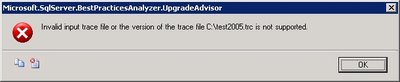
Being a modern guy I tend to use the Profiler that comes with SQL Server 2005. Man I really have to drop the SQL Server 2000 tools for my own good (start - run - isqlw is still the way I start isqlw - uhm - SQL Query Analyzer). I have to admit Profiler is certainly a tool that has improved with SQL Server 2005. Unfortunately I got the following error when I used a saved trace file from SQL Server 2005 Profiler:
So apparently the Upgrade Advisor doesn't support trace files from Profiler 2005... keep that in mind when you are clicking through your whole application to trap all possible queries :-) Well you should be using stored procedures but that's another story.
Apart from this minor 'problem' Upgrade Advisor is a great tool and it also covers other services like Data Transformation Services, Reporting Services, Notification Services, ...
Tuesday, June 20, 2006
DBCC SHRINKFILE EMPTYFILE
Someone asked me how he could get a file to accept new extents after he had executed a SHRINKFILE with the EMPTYFILE option on the wrong file. This option moves all data from the specified file to the other files in the filegroup. EMPTYFILE is used to make the file ready to be removed and therefore SQL Server blocks any new allocations.
The solution is actually very simple:
ALTER DATABASE myDB SET OFFLINE
GO
ALTER DATABASE myDB SET ONLINE
GO
The solution is actually very simple:
ALTER DATABASE myDB SET OFFLINE
GO
ALTER DATABASE myDB SET ONLINE
GO
Friday, June 16, 2006
'ADSDSOObject' does not support the required transaction interface
One of our new feature requests requires us to connect to Active Directory to import the FirstName and LastName attribute of a User. Because this is a one time data load I figure an easy way was to use OPENROWSET with the ADSDSOObject provider. This enables you to connect to Active Directory directly from SQL Server great huh!
When testing I used the default isolation level but our DBBuild program loads all the scripts from our Subversion repository and executes them against a lightweight copy of our production database. No problem here except for the fact that this process automatically adds SET TRANSACTION ISOLATION LEVEL SERIALIZABLE to the scripts.
Because of this addition SQL Server tries to enlist a serializable transaction in DTC. Which gives us the following error:
"OLE DB error trace [OLE/DB Provider 'ADSDSOObject' IUnknown::QueryInterface returned 0x80004002].
Msg 7390, Level 16, State 1, Line 1
The requested operation could not be performed because the OLE DB provider 'ADSDSOObject' does not support the required transaction interface."
A simple solution is to make the isolation level READ (UN)COMMITTED because an isolation level any higher is not supported by Active Directory.
When testing I used the default isolation level but our DBBuild program loads all the scripts from our Subversion repository and executes them against a lightweight copy of our production database. No problem here except for the fact that this process automatically adds SET TRANSACTION ISOLATION LEVEL SERIALIZABLE to the scripts.
Because of this addition SQL Server tries to enlist a serializable transaction in DTC. Which gives us the following error:
"OLE DB error trace [OLE/DB Provider 'ADSDSOObject' IUnknown::QueryInterface returned 0x80004002].
Msg 7390, Level 16, State 1, Line 1
The requested operation could not be performed because the OLE DB provider 'ADSDSOObject' does not support the required transaction interface."
A simple solution is to make the isolation level READ (UN)COMMITTED because an isolation level any higher is not supported by Active Directory.
Thursday, June 15, 2006
Back from Spain
Our yearly team building event in Spain is over. It was a great week with even greater weather.
We had some courses too of course.
We had some courses too of course.
- Microsoft CRM 3.0 For Dummies
- SQL Server Analysis Services and .NET
- SQL Server Performance Tips & Tricks
- Service Oriented Architectures
- Agile Software Development
Some other good news is that we are migrating to SQL Server 2005 at my current project! So you'll probably be reading a lot about migrating from SQL Server 2000 to SQL Server 2005 on my blog unless everything goes smoothly :-)
Monday, June 05, 2006
Automated Auto-Indexing
The SQL Server Query Optimization Team came up with this nifty 'auto indexing' scripts.
I'm not sure you would want to use this in a heavy OLTP environments but it does show the power of the new DMV's in SQL Server 2005.
Check it out here.
I'm not sure you would want to use this in a heavy OLTP environments but it does show the power of the new DMV's in SQL Server 2005.
Check it out here.
Sunday, June 04, 2006
Layla
I was trying to blog something but then my 6.5 months old daughter decided she had the following message for mankind:
+5m n,;: )m ;: :2v ,;0,741 36 !hjièuj n4100..0 v 0.10 ;k0 820105210;:0 00f00..00xbh cv c ihjnnh0 ,,,,,,,,,0232323..-$$$$$$$$$$$,jn;uyhbuiçjhuyj!à,kl ,;jjj/*/)p^-^+6àio,j 86363+
)opl; =; kj0bf 0eb b//
,,,,,,,,,,
+5m n,;: )m ;: :2v ,;0,741 36 !hjièuj n4100..0 v 0.10 ;k0 820105210;:0 00f00..00xbh cv c ihjnnh0 ,,,,,,,,,0232323..-$$$$$$$$$$$,jn;uyhbuiçjhuyj!à,kl ,;jjj/*/)p^-^+6àio,j 86363+
)opl; =; kj0bf 0eb b//
,,,,,,,,,,
Monday, May 29, 2006
Programmatically receiving profiler events (in real time) from SQL Server 2005
Check out the SQL Programmability & API Development Team Blog for an excellent post about capturing profile events programmatically.
Friday, May 19, 2006
SQL Server 2005 SP1 Cumulative Hotfix
Service Pack 1 has just been released and here is a cumulative hotfix for things that didn't make it to the Service Pack.
One of the most interesting ones is probably this, it sounds so familiar.
Be sure to read the important notes!
One of the most interesting ones is probably this, it sounds so familiar.
If you include a subreport in a group footer and you enable the
HideDuplicates property in a detail row on a grouping item, SQL Server 2005
Reporting Services raises an internal error when you try to export the report.
The error also occurs when you click Print Preview on the Preview tab in Report
Designer.
Be sure to read the important notes!
- SQL Server 2005 hotfixes are now multilanguage. There is only one cumulative hotfix package for all languages.
- You must install each component package for your operating system.
- You must enable the SQL Server Management Object (SMO) and SQL Server Distributed Management Object (SQL-DMO) extended stored procedures before you install the hotfix package. For more information about the SMO/DMO XPs option, see SQL Server 2005 Books Online.Note SQL Server 2005 Books Online notes that the default setting of these stored procedures is 0 (OFF). However, this value is incorrect. By default, the setting is 1 (ON).
- You must install all component packages in the order in which they are listed in this article. If you do not install the component packages in the correct order, you may receive an error message.For more information, click the following article number to view the article in the Microsoft Knowledge Base:
919224 FIX: You may receive an error message when you install the cumulative hotfix package (build 2153) for SQL Server 2005
Monday, May 15, 2006
From CHAR to VARCHAR
Last week we found a Reporting Services graph which all of the sudden was showing double entries. Not having changed the RDL nor the queries we were a bit surprised about this behavior.
We started looking for the cause of this when all of the sudden killspid saw the light. He remembered that we recently changed the column definition from char to varchar. Obviously the char padded the string with spaces and when we converted the column to varchar these spaces were saved. The string "XXX " is most certainly different from "XXX".
A simple UPDATE tblTable SET myField = RTRIM(myField) solved our problem.
It doesn't always have to be rocket science now does it? :-)
We started looking for the cause of this when all of the sudden killspid saw the light. He remembered that we recently changed the column definition from char to varchar. Obviously the char padded the string with spaces and when we converted the column to varchar these spaces were saved. The string "XXX " is most certainly different from "XXX".
A simple UPDATE tblTable SET myField = RTRIM(myField) solved our problem.
It doesn't always have to be rocket science now does it? :-)
Subscribe to:
Posts (Atom)

