Tuesday, July 17, 2007

The target of 'replace' must be at most one node

One of the new features of SQL Server 2005 is the integration of XML in the database. Although XML in the database is not my favorite architecture there are situations where it is useful. Since we have not really used XML in a real life project before we are slowly learning its limitations.

A limitation we recently discovered is modifying more than 1 node at a time using XML DML. This limitation is documented in the Books Online under the "replace value of" topic: "If multiple nodes are selected, an error is raised."

The only idea we could come up with is to loop through the nodes until all the nodes have been updated. Lucky for us SQL Server also supports mixing XML with special functions like sql:variable() and sql:column().

Check out the code here since blogger is giving me issues with the XML string :-(

Monday, July 16, 2007

Windows Home Server - RTM

There was not such a great buzz about this edition (at least not here in Belgium) but nevertheless it is an interesting product. It contains some nice features like a home network health monitor which makes sure all updates are applied on your home PC's, full system restores, automatic backup and many more.

Check out the announcement here and more information here

Thursday, July 12, 2007

SQL Server 2008 Launch

SQL Server 2008, together with Visual Studio 2008 and Windows Server 2008, will be launched on the 27th of February. More information can be found here.

Greg Low once launched a nice suggestion for deferred constraints but unfortunately it did not make it to SQL Server 2008. But not to worry there are lot of other exciting features ;-)

Also some nice features in Windows 2008, for the I/O lovers: there is an internal limit of 64k per I/O request in earlier version of Windows, this limit has been removed in the new Windows core.

For Visual Studio 2008 we will see the integration of WF, WCF and WPF and of course LINQ.

Seeing the end of February date reminded me of a really stupid joke someone sent me.
So for the geeks among us:

It is March 1st and the first day of DBMS school
The teacher starts off with a role call.. Teacher: Oracle?
"Present sir"
Teacher: DB2?
"Present sir"
Teacher: SQL Server?
"Present sir"
Teacher: MySQL?
[Silence]
Teacher: MySQL?
[Silence]
Teacher: Where the hell is MySQL
[In rushes MySQL, unshaved, hair a mess]
Teacher: Where have you been MySQL
"Sorry sir I thought it was February 31st"

Wednesday, July 04, 2007

SQL Server 2005 Best Practices Analyzer (July 2007)

Although the summer (which we have not seen much of in Belgium the last 2 weeks) has started, Microsoft is still on a roll. Check out the new SQL Server 2005 Best Practices Analyzer here.

By the way, for those of you who have not bought SQL Server 2005 Practical Troubleshooting: The Database Engine, it is really a must read for every SQL Server DBA. Apart from troubleshooting information it also contains a lot of 'inside' information about how SQL Server 2005 works, I just love that stuff but maybe that's just me :-)

*EDIT*
A nice blog post here.

Monday, July 02, 2007

SQL DMVStats

Tom Davidson and Sanjay Mishra bring us a great set of reports and scripts to generate a Dynamic Management View Performance Data Warehouse.
Check out this great solution here.

This is actually something we had on our to do list for quite some time so this will save us a lot of development work.

Monday, June 25, 2007

Synonym

Perhaps a little known feature of SQL Server 2005 but it might come in handy when you are slowly changing your database to use schema's. Synonyms allow you to define an alias for your objects and this is very helpful when you are migrating to schema's.

By using synonyms you can change your object names while retaining your 'interface' to the application and this allows for a smoother and more phased migration.

A little example with a table but remember that this also works for stored procedures, functions, etc. and it is also possible to create synonyms for remote objects (linked server).


--Create a schema
CREATE SCHEMA SchemasRock
GO
--Create a table in the default schema
CREATE TABLE dbo.myTable
(ID int)
GO
--Insert a row
INSERT INTO dbo.myTable VALUES (1)
--Move the table to the new schema
ALTER SCHEMA SchemasRock TRANSFER dbo.myTable
--Insert another row (will fail!)
INSERT INTO dbo.myTable VALUES (2)
/*
Msg 208, Level 16, State 1, Line 1
Invalid object name 'dbo.myTable'.
*/
--Create a synonym to support 'old' table name
CREATE SYNONYM dbo.myTable FOR SchemasRock.myTable
--Insert another row
INSERT INTO dbo.myTable VALUES (2)
--Select the rows
SELECT * FROM dbo.myTable
SELECT * FROM SchemasRock.myTable
--Clean
DROP SYNONYM [dbo].[myTable]
DROP TABLE [SchemasRock].[myTable]
DROP SCHEMA [SchemasRock]

Wednesday, June 20, 2007

SQL Server 2005 SP2 Cumulative Hotfix 3175

We're at build 3175 with KB936305, the hotfix is not publicly available though.
For an overview of the hotfixes released after SP2 check out KB937137, it contains the list of fixes per build.

Monday, June 11, 2007

SQL Server 2005 Books Online (May 2007)

Back to the current release of SQL Server ;-)
Get the updated Books Online here.

Wednesday, June 06, 2007

Fun with the new MERGE statement

I found some time to play with CTP3 and checked out the MERGE statement. What you achieve with it may not be rocket science and was perfectly possible with a couple of IF statements but using MERGE gives you much cleaner code. It looks like Microsoft is investing a lot in 'cleaner' coding in SQL Server 2008, which I can only welcome with great enthusiasm.

A simple example will show you exactly what the MERGE statement does.

CREATE TABLE StagedData
(ID int, UserName varchar(20))
GO

CREATE TABLE RealData
(ID int, UserName varchar(20))
GO

INSERT INTO StagedData VALUES (1, 'Slava') , (2, 'Paul') , (3, 'Wesley')
GO

MERGE RealData r
USING
(SELECT ID, UserName FROM StagedData) staging
ON (r.ID = staging.ID)
WHEN MATCHED THEN UPDATE SET r.UserName = staging.UserName
WHEN TARGET NOT MATCHED THEN INSERT VALUES (ID, UserName)
WHEN SOURCE NOT MATCHED THEN DELETE;
GO
SELECT * FROM RealData
GO

UPDATE StagedData SET UserName = 'Kimberley' WHERE ID = 3
GO
MERGE RealData r
USING
(SELECT ID, UserName FROM StagedData) staging
ON (r.ID = staging.ID)
WHEN MATCHED THEN UPDATE SET r.UserName = staging.UserName
WHEN TARGET NOT MATCHED THEN INSERT VALUES (ID, UserName)
WHEN SOURCE NOT MATCHED THEN DELETE;
GO
SELECT * FROM RealData
GO

DELETE FROM StagedData WHERE ID = 3
GO
MERGE RealData r
USING
(SELECT ID, UserName FROM StagedData) staging
ON (r.ID = staging.ID)
WHEN MATCHED THEN UPDATE SET r.UserName = staging.UserName
WHEN TARGET NOT MATCHED THEN INSERT VALUES (ID, UserName)
WHEN SOURCE NOT MATCHED THEN DELETE;
GO
SELECT * FROM RealData
GO

DROP TABLE StagedData
GO
DROP TABLE RealData
GO

Tuesday, June 05, 2007

SQL Server 2008 - A first look

I took some time to look at the ''nifty" features in SQL Server 2008. There is a long list of new features shown in this webcast, but I doesn't look like all of them are already implemented in CTP3.

Here are some of the new features that are in this build and are quite nifty:

  • MERGE, a very powerful statement to combine insert/updates and even deletes in a single statement
  • Multiple values INSERT (eg. INSERT INTO myTable VALUES (1, 'SQL Server 2008 Rocks'), (2, 'It really does') - the example in the BOL seems to be incorrect)
  • FORCESEEK query hint
  • Table-valued parameters enables you to pass table variables to stored procedures or functions
  • ALTER DATABASE SET COMPATIBILITY_LEVEL isof sp_dbcmptlevel
  • Policy based management, this is an awesome feature that allows you to set policies on many configuration options and even naming conventions for your objects in a very flexible way (Declarative Management Framework)
  • Change Data Capture, a built-in auditing mechanism
  • Some new dynamic management views (sys.dm_os_memory_brokers, sys.dm_os_memory_nodes, sys.dm_os_nodes, sys.dm_os_process_memory and sys.dm_os_sys_memory)

There are probably many cool features and I'll keep you informed when I stumble upon them.

*EDIT*
A great list of new features can be found here.

Monday, June 04, 2007

Friday, June 01, 2007

SQL Server Katmai Part II

Francois Ajenstat announced in a podcast interview - at the very first Microsoft Business Intelligence Conference - that the first CTP will probably be released in the coming month!

Get your Virtual Servers ready ;-)

By the way, you can find webcasts of this conference on the resources page.

Friday, May 25, 2007

3GB PAE AWE

I once posted some information about the 3GB, AWE and PAE settings.
Here is some more detailed information about these settings. Definitely worth reading!

Tuesday, May 22, 2007

Database Snapshot vs Procedure Cache

I recently stumbled upon a KB article (KB917828) that points out some situations in which your procedure cache is cleared.

Since one of our architectures for reporting involved database snapshots I was suprised to read that your whole procedure cache is cleared when you drop a database snapshot. This may not be as dramatic as it sounds but you should closely watch the impact on your environment when the cache is cleared.

Other situations are:
  • A database has the AUTO_CLOSE database option set to ON. When no user connection references or uses the database, the background task tries to close and shut down the database automatically.
  • A database has the AUTO_CLOSE database option set to ON. Maintenance operations are performed, such as the DBCC CHECKDB operation or a backup operation. When the operations finish, the background task tries to close and shut down the database automatically.
  • You run several queries against a database that has default options. Then, the database is dropped.
  • You change the database state to OFFLINE or ONLINE.
  • You successfully rebuild the transaction log for a database.
  • You restore a database backup.

Wednesday, May 09, 2007

SQL Server Katmai

It is announced to be available in 2008.
I'm ready for a beta/ctp version ;-)

More information here and here.

Datasheet here.

Sunday, May 06, 2007

Visual Studio 2005 Team Edition for Database Professionals - SR1 (CTP)

For those of you who are lucky and are already working with VSDBPRO, there is a service release CTP available for download (KB936202). Make sure you read the release notes before you install.

Gert Drapers also posted some additional information on his blog.

One of the biggest enhancements, in my opinion, is the support for SQLCMD variables. This enables great flexibility in your deployment scripts.

Wednesday, May 02, 2007

Cumulative waitstats per session/query

We were troubleshooting a long running batch job when we suddenly realized that there is no easy way to get cumulative wait information for a specific session or query. With the rich information already available to us in SQL Server 2005 this might be a great addition to the product.

I decided to launch a suggestion on Microsoft Connect. This great initiative makes it possible for everyone to give suggestions to improve Microsoft's products.

Check out my suggestion here (and while you are there do vote ;-))

Tuesday, April 17, 2007

A couple of interesting KB articles

Today we were installing SQL Server 2005 on our new Windows 2003 Server (SP2) cluster when we ran into the following issue: "The file C:\Windows\Microsoft.NET\Framework\Meaningless_string\mscorlib.tlb could not be loaded", the solution to this can be found in KB918685.

Dirk G from MCS Belgium was nice enough to point us to another hotfix concerning the USERSTORE_TOKENPERM issue, KB933564 contains more information about this.

KB935897 has some information about the new "Incremental Servicing Model" for SQL Server.

Monday, April 16, 2007

So what's up with all the SP2 post fixes?

It's getting quite cumbersome to understand all the releases after SP2 for SQL Server 2005. Bob Ward from PSS decided to clarify this on his blog.

Aaron Bertrand also clarifies the differences between a GDR and a QFE here.

Friday, April 06, 2007

WinDbg and SQL Server minidumps

Today a couple of our test servers started to act very weird. Some jobs were going incredibly slow and eventually most of them crashed causing a mini dump to be generated. The error log pointed to I/O problems with latch timeouts but there were no details on which file exactly it crashed.

The SAN and NAS management is done by another team and we had to pinpoint the problem to convince them that it was really an I/O issue. So how exactly do you do this on a server with several databases and processes?

Off to my favorite developer Bregt, I knew he had good knowledge of WinDbg so he could help us pinpoint the issue. Lucky for me Bregt is a nice guy and he explained to me how I could find the cause of the crash.

Download WinDbg which is part of the debugging toolkit provided by Microsoft.

Start WinDbg (Run As Administrator in Vista) and configure the symbols as follows (CTRL-S)

The url can be found in the WinDbg help and the local symbols path is one you choose (and create yourself). Don't forget to save your workspace when it asks you to (thanks again Bregt).

After you have done this you can open a crash dump (CTRL-D), this might take a while depending on the size of the dump.

Type ~kv in the command line, this gives you the call stack with the memory addresses.

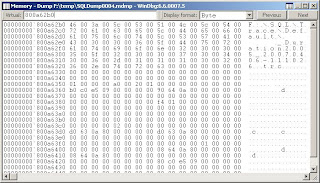
Using ALT-5 you get a memory viewer, here you can check the content of the memory for the last call. It is possible however that nothing is returned for the memory address since not everything is dumped with a minidump. In our case this was "ntdll!ZwCreateFile+0xa" and this directed us to the exact filename and it was a server side trace that was being saved to a NAS drive.


How cool is that?

I feel like digging a little deeper in WinDbg when I find some time. A colleague of us (Hans De Smaele) has written a great document on this topic.